Drip-feed splits one order into several smaller runs with a pause between them, so a number grows in steps instead of jumping all at once. Refill tops up units that drop after an order has finished, on services that offer it and within a set period. Used together, they are the two simplest ways to make SMM panel orders look more gradual and hold up better over time.
This guide explains how each option works on 9SMM.COM, when to use it, and the mistakes that cause failed runs or rejected refills.
What is drip-feed on an SMM panel?
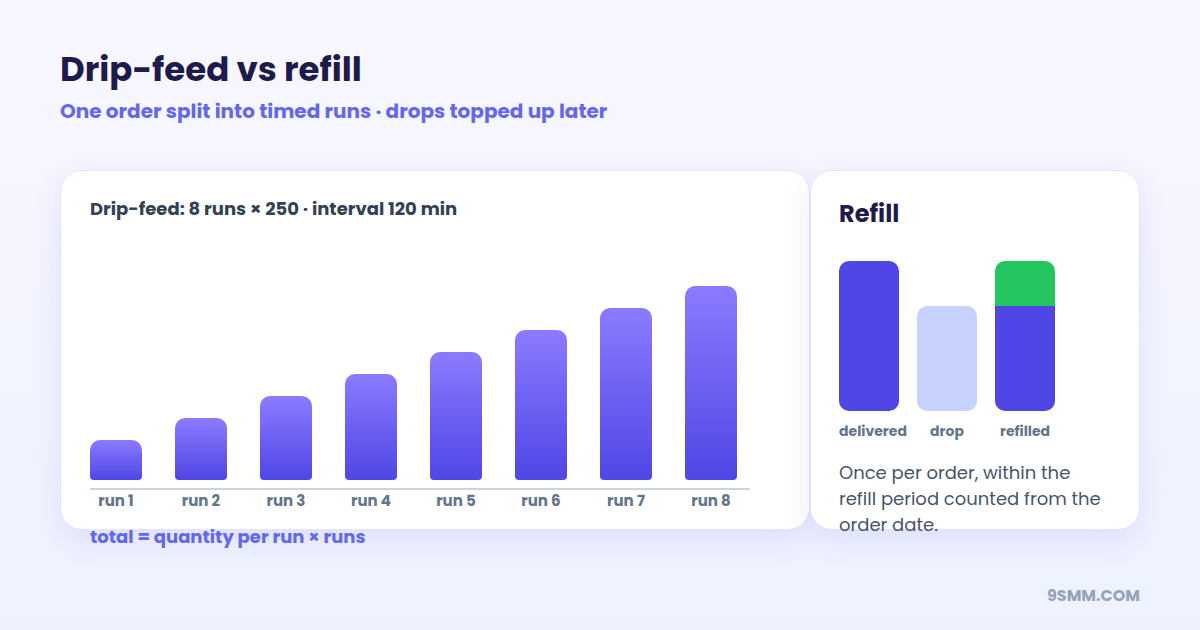
Drip-feed turns one order into a schedule. Instead of sending 5,000 followers in a single burst, you can send 10 runs of 500 with an hour between each run.
On 9SMM.COM, a drip-feed order has three settings:
| Setting | What it means | Allowed range |
|---|---|---|
| Quantity per run | Units delivered in each run | Must be within the service's min and max |
| Runs | How many times the run repeats | 2 to 100 |
| Interval | Minutes to wait between runs | 0 to 1,440 (24 hours) |
The total ordered is quantity per run × runs, and the full charge is taken from your balance when you place the order.
Worked example
You want 3,000 followers on a new profile over roughly a day.
- Quantity per run: 250
- Runs: 12
- Interval: 120 minutes
Total: 250 × 12 = 3,000 followers, delivered in 12 steps spread over about a day. If the service costs $1.20 per 1,000, the order costs 3,000 × $1.20 ÷ 1,000 = $3.60, charged up front.
When drip-feed helps
- Larger follower or subscriber orders, where a single overnight jump would stand out.
- Views on a series of posts, when you want each post to build naturally rather than spike.
- Reseller orders where your customer asked for gradual delivery.
When drip-feed does not help
- Very small orders. If the total is close to the service minimum, there is nothing to split.
- Services that are already slow or "gradual" by design.
- Making the practice allowed. Drip-feed lowers how conspicuous growth looks. It does not change platform rules; see is it safe to use an SMM panel.
Drip-feed mistakes to avoid
- Run size below the minimum. Each run is a separate delivery and must respect the service's minimum and maximum.
- A private or changed link. The link must stay public for every run. A profile switched to private midway is a common reason for partial or canceled results. Check links first with the link checker.
- Stacking orders. You cannot run two active orders on the same link and the same service at once; the second one is rejected until the first finishes.
- Cancelling expecting a full refund. If you cancel a drip-feed order, the run currently being delivered finishes first. Runs that have not started are canceled and refunded, and no new runs are sent.
What is refill on an SMM panel?
Platforms regularly remove accounts they consider fake, so part of a delivered order can disappear days or weeks later. Refill is a free top-up of those drops.
On 9SMM.COM, a refill request is accepted when all of these are true:
- the service is marked Refill;
- the order closed as completed or partial;
- the request is made within the refill period shown on the service, counted from the day the order was placed (a service with no period set has no time limit);
- no refill has been requested on that order before.
You can request a refill from the Orders page or through the API (the refill and refill_status actions). Orders on services without refill are not topped up or refunded for drops after delivery. Full rules are in the refund and refill policy.
Refill vs refund
These are easy to confuse:
| Refill | Refund | |
|---|---|---|
| Covers | Units that dropped after delivery | Units that were never delivered |
| Applies to | Services marked Refill, within the period | Orders that close as Partial or Canceled |
| Result | Units are delivered again | Money returns to your panel balance |
| Automatic? | No, you request it once per order | Yes, when the order status changes |
The refund amount is proportional: charge × remains ÷ quantity, minus anything already refunded.
How to get the most from refill
- Write down the start count when you order, so you know what was actually added.
- Check the account again shortly before the refill period ends. You only get one request per order, so do not use it on the first small drop if more drops are likely.
- Prefer refill services for followers and subscribers. They cost more per 1,000, but the effective price per unit kept is often lower. See the worked example in how to choose the best SMM panel.
Using drip-feed and refill together
For a follower order that you want to look natural and hold up:
- Pick a follower service marked Refill, and note its refill period.
- Place a minimum test order first and check it after a week.
- For the real order, enable drip-feed with runs sized comfortably above the minimum and an interval that fits your timeline.
- Record the start count.
- Keep the profile public until the last run completes.
- Check again before the refill period ends and request one refill if numbers dropped.
- Keep follower, like and comment ratios believable; the engagement rate calculator shows the ratio brands look at.
Frequently asked questions
Does drip-feed cost more?
No. The price is the service rate × total quantity ÷ 1,000, the same as a normal order of the same size. The difference is only in how delivery is scheduled.
Can I use drip-feed through the API?
Yes. API orders follow the same rules as the website, including drip-feed runs, refill and cancel. See the SMM API documentation.
How many times can I request a refill?
Once per order on 9SMM.COM, within the service's refill period.
Why was my refill request rejected?
Usually because the service has no refill, the period has ended, the order did not close as completed or partial, or a refill was already requested for that order.
Is refill the same as a "lifetime guarantee"?
No. A refill has a defined period and conditions. Be cautious of any panel promising lifetime guarantees without written terms.
New to panels? Start with what an SMM panel is.